ChatGPT Sticky Notes: Add notes or highlight conversations
ChatGPT Sticky Notes: Add notes or highlight conversations
ChatGPT has become an essential assistant for millions of users. Whether you’re a developer, writer, student, or researcher, ChatGPT helps you brainstorm, solve problems, and explore ideas. But what if you could supercharge your ChatGPT experience by adding your own personal notes directly to your conversations? Introducing the ChatGPT Sticky Notes Chrome extension — a simple yet powerful tool to help you stay organized and productive.

What Is ChatGPT Sticky Notes?
ChatGPT Sticky Notes is a lightweight Chrome extension that allows users to attach personal notes to individual ChatGPT conversations. Instead of copying information into separate note-taking apps or losing track of context, you can now create and view sticky notes right inside ChatGPT’s interface.
Main screenshot:
Each note is saved per conversation, meaning you can revisit a specific chat and immediately recall what you were working on, your ideas, reminders, or important points.
How It Works
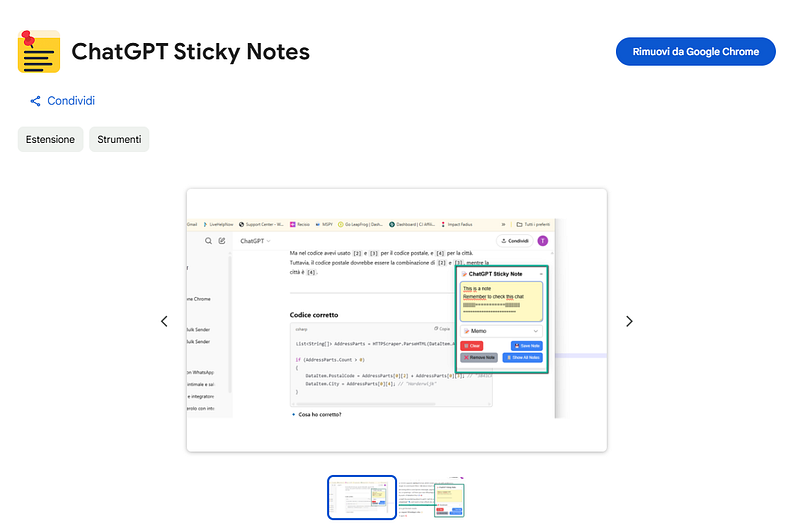
First of all install the extension from the Chrome Web Store.
Chrome web store link: https://chromewebstore.google.com/detail/chatgpt-sticky-notes/jlccjgfmfpeechopgpclpkadohnbbgnn
Once installed it automatically injects the sticky note panel into the ChatGPT interface. The panel appears fixed on the right-hand side of the screen, with a textarea for writing your note, buttons for saving, clearing, removing, and viewing all notes, and a dropdown for selecting your preferred icon.
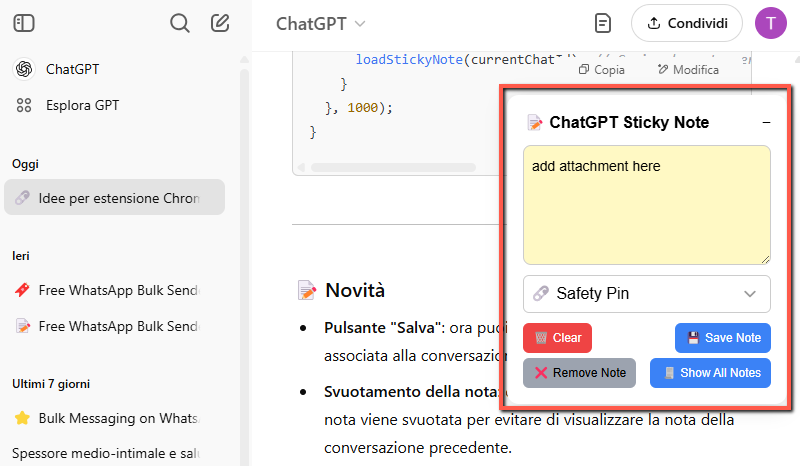
Every ChatGPT conversation has a unique chat ID (as seen in the URL). The extension uses this ID to associate a specific note with the conversation. When you switch between conversations, the note content updates accordingly.
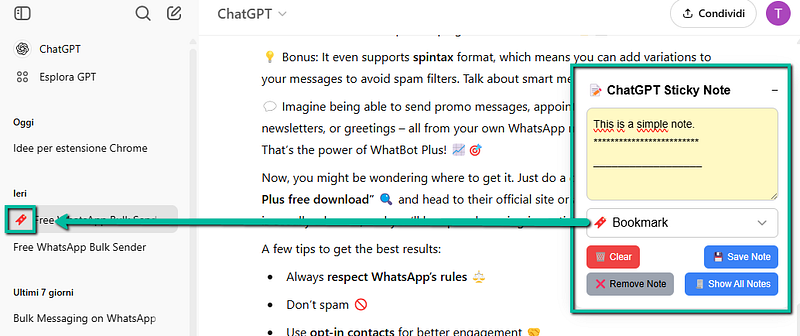
If you’ve saved a note for a chat, the icon you selected will appear next to the chat’s title in the ChatGPT sidebar. This makes it visually easy to recognize which chats have important annotations.
Key Features
- Sticky Note UI Embedded in ChatGPT: The extension adds a beautifully styled sticky note panel on the right side of the ChatGPT interface.
- Per-Conversation Notes: Notes are tied to the specific conversation based on the chat URL.
- Auto-Save and Manual Save: You can either let your notes auto-save or manually save them when you’re done.
- Icon Marker in Sidebar: A small icon (e.g., 📌, 📟, 🌟) appears next to the chat title in the sidebar, indicating that a note is saved for that conversation.
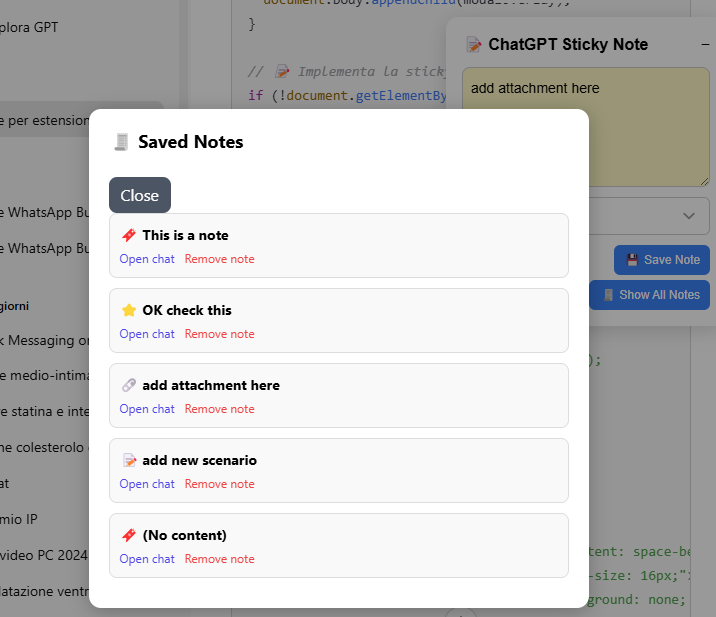
- Modal to View All Notes: Easily browse through all saved notes in a modal with quick links to open the corresponding chat.
- Note Removal Option: You can delete individual notes or clear all notes from the popup menu.
- Icon Customization: Choose your favorite icon for each note.
Seamless User Experience
The sticky note panel is styled to resemble a real sticky note, with a yellow background and rounded borders. It’s non-intrusive, easy to minimize, and fully integrated with the ChatGPT UI.
If you close and reopen ChatGPT, the sticky note will remember if it was minimized or expanded, saving you extra clicks.
Want to quickly review all your saved notes? Just click on “Show All” and a modal appears listing every saved note, along with options to open the related chat or remove the note.
Popup Interface for Quick Access
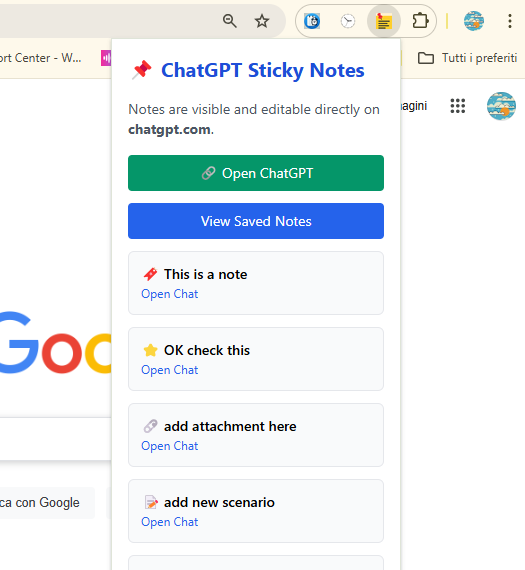
The extension also includes a Chrome popup window (accessible from the extension icon). From here, you can:
- Open ChatGPT in a new tab.
- View all saved notes in a simplified list.
- Delete all saved notes with a single click.
It’s a convenient way to get an overview of your notes even if you’re not inside ChatGPT.
Why You Should Use It
Productivity thrives on context and clarity. When you’re using ChatGPT for multiple projects or tasks, keeping track of your ideas and reasoning becomes challenging. With ChatGPT Sticky Notes, everything stays where it belongs — alongside the conversation that inspired it.
- No more switching apps
- No more lost context
- No more mental clutter
Whether you’re planning a blog post, debugging code, preparing interview questions, or just exploring ideas — you’ll always have your thoughts at hand.
Privacy and Storage
All your notes are stored locally using chrome.storage.sync, which means:
- Notes are synced across your Chrome browsers (if you’re signed in)
- Your data is not sent to any external server
- You’re always in control
Get Started
You can install the ChatGPT Sticky Notes extension from the Chrome Web Store at the following link:
https://chromewebstore.google.com/detail/chatgpt-sticky-notes/jlccjgfmfpeechopgpclpkadohnbbgnn
Once active, head over to https://chatgpt.com and start adding notes!
It’s simple, elegant, and designed to blend seamlessly into your ChatGPT experience.
You could be also interested in ChatGPT to PDF Exporter [Chrome Extension].