How to Rotate a Video by a Few Degrees
How to Rotate a Video by a Few Degrees
When you record a video on your mobile phone and then transfer it to a computer or TV for viewing, you often see the video rotated 90 degrees or even flipped 180 degrees. However, there are also cases in which the video is not perfectly aligned and with an angle of a few degrees.
In the case of video rotated by 90 or 180 degrees, there are many video editor programs (even free) that can straighten the video in a simple way and save it in the correct format. In the case of video rotated by a few degrees, however, the software solutions that can fix the problem are very few.
Below we point out two software that can rotate a video by a few degrees.
#1. Rotate Videos a few degrees with VLC
If you want to make more precise rotations, for example 30 degrees, or 45 degrees, or a few degrees (if the video is slightly skewed and crooked), then you could use the famous player VLC.
In VLC you can use a function that can straighten the video and display it correctly. However, it does not allow you to save the video with this setting but below we will tell you a way to “capture” the straightened video on VLC and save it permanently.
Open VLC, load the video to straighten into it, then go to Tools -> Effects and Filters and from the window that opens access the Video Effects tab. Then access the Geometry sub-section and from here click on the “Rotation” box and thanks to the knob you can start rotating the video with extreme precision and by how many degrees you want.
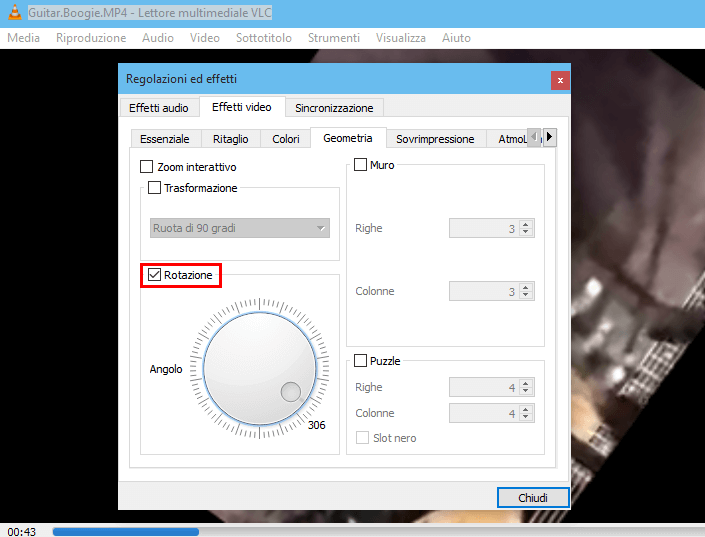
Once the video is well aligned, if you want to save it with this setting you could use a program like AllMyTube that allow to record and save any video file. Just open the program and use the “Video Recorder” function present in the app to select the VLC screen and practically record the straightened video in order to save it permanently on your PC.
#2. Rotate Videos a few degrees with Avidemux
Firstly, go to the official Avidemux website and download the version compatible with your computer (Windows, macOS or Linux)
After installation and launch the program. Now that you see the Avidemux window, click on the button with the blue folder located at the top left, select the Open item and import the video you want to act on into the program. Then set the video and audio codecs in which to encode the movie using the Video and Audio Output drop-down menus, visible in the left sidebar.
Then click on the Video menu located at the top and select the Filters item from the latter. In the new window that appears on the screen, select the word Transform in the left column and double-click on the item Rotation in the central column.

Then define the rotation level you want to apply to the video by choosing the option you prefer from the Angle menu in the additional window displayed, then click the OK button, so as to save the changes made. To preview the final result, then, click on the Preview button in the filter window.