How to convert your Photo to Santa Claus
How to convert your Photo to Santa Claus
Transforming photos into Santa Claus is primarily a playful and creative way to embrace the Christmas spirit, share joy, and connect with others during the holidays. If you have a photo of yourself (or that of a relative or friend) and you are looking for a way to transform the character in the photo into a funny Santa Claus, below you will find a simple, free and fast way!
We have already seen in a previous article how to transform yourself into a cartoon, and in the same way also into a Simpson character. The protagonist of the Christmas holidays could not be missing, that is, the legendary Santa Claus!
Below we highlight an online service (and also software) that allows you to convert your photo into Santa Claus. All you have to do is get a photo of yourself where your face is clearly visible, so that the software can analyze it and transform it to the highest quality. If you are curious how it works, don’t wait any longer and follow the very simple steps described below.
How to convert Photo to Santa Claus
Photo Cartoon, this is the name of the service (100% free) that many users use every day to transform their photos into cartoons, drawings or popular characters. Within this service, available in both a web-based version and a software version for Windows, there are dozens and dozens of “filters” and “photomontages” that can be applied to photos to make them original and ready to share on social networks! Among the available effects there is also one that allows you to create Santa Claus with your face!
Here are the steps to follow.
Step 1. Open your browser (Chrome, Edge, Firefox, or others) and access the official PhotoCartoon.net website. A main screen will open with a section at the top where you can upload your photo (the one you want to transform into Santa Claus).
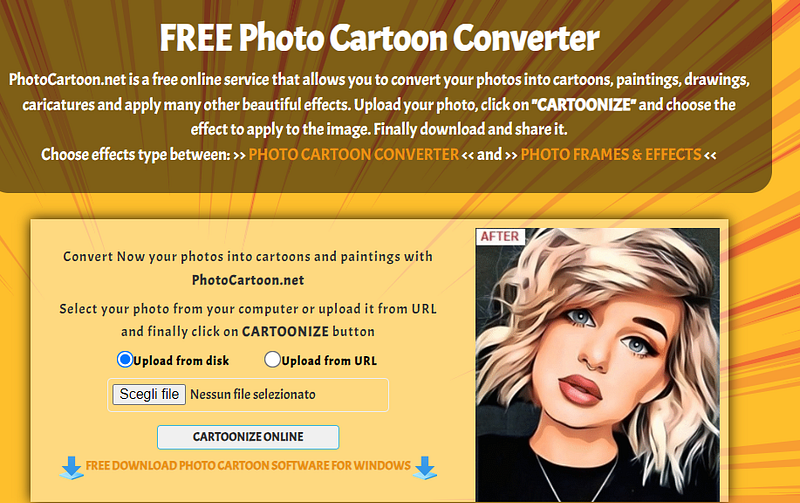
Step 2. Now press the Choose File button and select the photo on which you want to apply the photo montage from your computer or mobile device. You can also choose a photo where you are taken with your whole body, the program will in fact be able to isolate the face and convert only that part.
Step 3. After uploading the photo, press on CARTOONIZE ONLINE and wait for the page to open with the effects and photomontages available in the system. From the sidebar on the left you can choose the different effects. Among these effects there are several that allow you to transform photos into cartoons, others that transform the photo into drawings or paintings.
Further down you will also find the CHRISTMAS CARTOON effect and your photo will automatically be converted into Santa Claus with your face.
In our test we used the following source photo:

…and after the conversion here is the result obtained with PhotoCartoon.net:
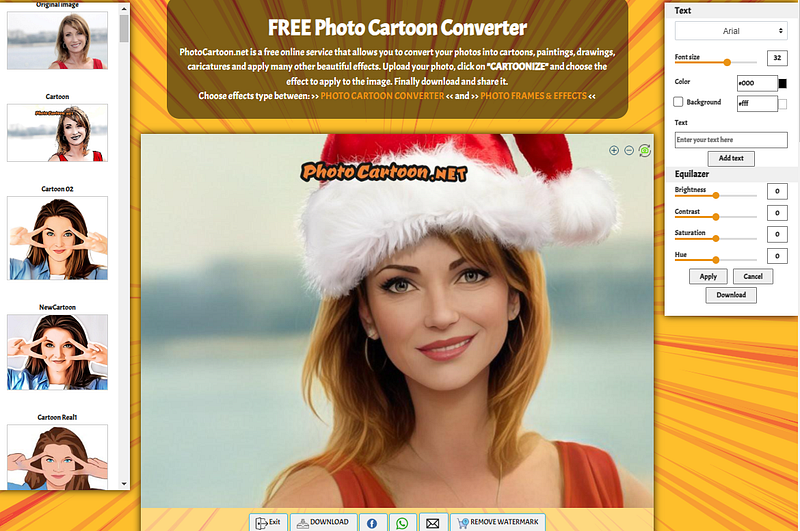
The converted photo will appear in the center of the program after a few seconds. As you can see, in addition to the Santa Claus, the photo will also be “cartoonized”. This means that the photo effect will be much more beautiful and will highlight the features of the face.
If in addition to the “Santa Claus” effect there are also other Christmas photo montages that you can apply to your photos. Access the photomontages section of PhotoCartoon and here you can apply, for example, this beautiful Christmas frame.

Step 4. To the right of the window there is a toolbar that you can use to adjust some photo parameters such as contrast, brightness and gamma. You will also be able to add a text on the photo before saving and sharing
Step 5. To save your “Santa Claus” photo you simply need to press the Download button. The photo will be saved on your PC in JPG format and at that point you can do whatever you want (print, share online, etc…)