Cookie Clicker: How to Make Automatic Clicks
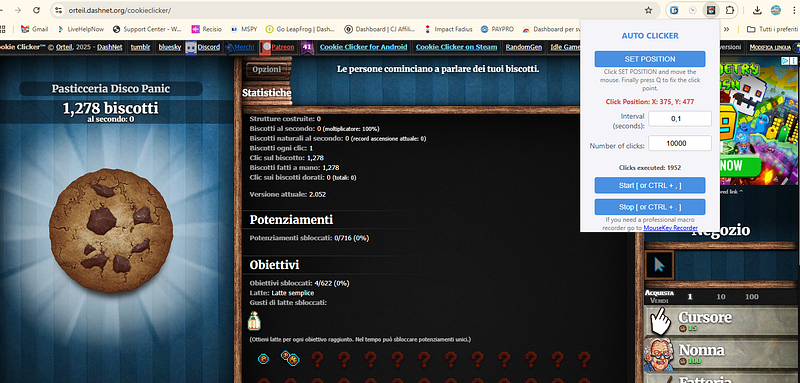
Cookie Clicker is one of the most addicting incremental games on the web.
The game is very simple: you start by clicking on a big cookie to bake your first cookies. As you earn cookies, you can spend them on upgrades and buildings like cursors, grandmas, and factories that automatically generate more cookies for you. The more you play, the faster your cookie production grows. Your goal is to bake as many cookies as possible and unlock achievements, upgrades, and even reset the game to gain permanent bonuses called “Heavenly Chips.”
Whether you’re a beginner trying to farm your first million cookies or a seasoned veteran going for heavenly upgrades, one thing is certain: clicking manually can get tedious fast.
So, how can you automate those endless clicks? In this guide, we’ll show you how to make automatic clicks in Cookie Clicker using a safe and simple tool.
Is is possible to use an Auto Clicker?
Cookie Clicker rewards fast and consistent clicking. Using an auto clicker lets you:
- Boost your cookie production dramatically
- Maximize Golden Cookie opportunities
- Save your fingers from fatigue
- Progress faster without constant interaction
While the game itself includes upgrades like “Cursor” and “Grandma” for passive gains, nothing beats the sheer speed of automated clicking.
Recommended Tool: Auto Clicker Extension for Chrome
One of the best and easiest tools we’ve tested is the Auto Clicker Chrome extension. It’s lightweight, easy to set up, and works perfectly with Cookie Clicker.
How to Install and Use It:
- Open Chrome and go to the Auto Clicker Extension page.
- Click “Add to Chrome” and confirm the installation.
- Once installed, launch Cookie Clicker at cookieclicker.com.
- Open the Auto Clicker extension.
- Configure your click interval (e.g., every 10ms for super-fast clicks).
- Click on Set Position and move the mouse over the cookie. Press Q to confirm.
- Press Start — and watch the cookie count skyrocket!
Is It Safe to Use?
This method is safe to use on the web version of Cookie Clicker. However, keep in mind:
- Auto clickers are third-party tools, so only install trusted extensions.
- Avoid using scripts or bots that can compromise your browser security.
- This approach won’t work on mobile or Steam versions.
Final Thoughts
Using an auto clicker is a great way to supercharge your Cookie Clicker game without spending hours manually clicking. With the Auto Clicker Chrome extension, you can automate your cookie production effortlessly and focus on the fun upgrades, strategies, and achievements the game has to offer.
Happy clicking!