How to automatically open multiple URL / links

If you often find yourself opening dozens of links for research, marketing campaigns, or testing purposes, Multi Link Opener is about to change your workflow forever. Designed for speed, simplicity, and control, this Chrome extension allows you to open multiple URLs automatically with adjustable timing, smart tab management, and zero clutter. Whether you’re a web developer, SEO specialist, or digital marketer, this tool will save you time and help you stay organized.
✨ A Smarter Way to Open Multiple URLs
Multi Link Opener isn’t just another tab opener. It’s a professional-grade productivity extension that gives you complete control over how and when your links open. You can scan, import, or manually add URLs — then open them automatically at the speed you choose. Need the tabs to close automatically after a few seconds? No problem. Want to select only certain URLs? Easy. Every detail is built to make bulk URL management effortless.
<< INSTALL NOW MULTI LINK OPENER >>
📄 Three Flexible Import Methods
You can load your URLs in three convenient ways:
-
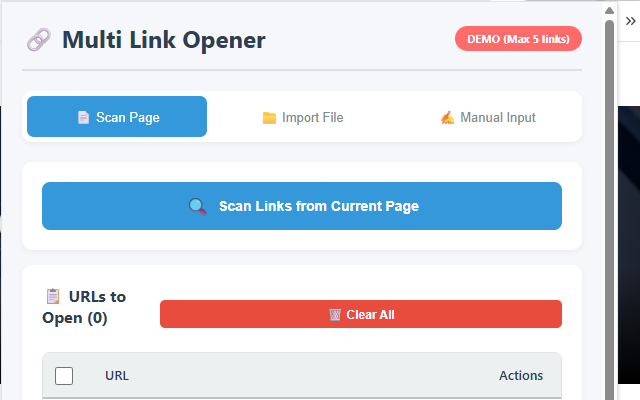
Scan Current Page – Instantly extract all clickable links from any web page. Great for grabbing all product links, search results, or reference pages in one click.
-
Import from File – Upload a simple
.txtfile containing URLs, one per line. Ideal for large campaigns, saved lists, or exported data. -
Manual Input – Paste or type your links directly into the text box. Perfect for quick testing or when you only have a few URLs.
Once imported, Multi Link Opener automatically removes duplicates and validates each link to ensure accuracy.
⚙️ Advanced Opening Controls
What makes this extension truly unique is its level of control. You can:
-
Adjust opening speed between 0.5 and 5 seconds per tab — perfect for managing browser performance and avoiding tab overload.
-
Enable Auto-Close so each tab closes after a specific delay — ideal for short inspections or automated workflows.
-
Select specific URLs from your list using checkboxes for precise control.
-
Monitor live progress with rows that highlight yellow while opening and green when completed.
You decide exactly how your tabs behave — no manual clicking, no chaos.

🎯 Built for Professionals, Loved by Everyone
Multi Link Opener is trusted by:
-
Web developers and QA testers who need to open multiple environments or staging links.
-
SEO experts managing backlinks, site audits, or competitor research.
-
Digital marketers running ad verification or campaign checks.
-
Researchers and students collecting and cross-referencing data.
-
Everyday users who simply want to save time managing multiple URLs.
<< INSTALL NOW MULTI LINK OPENER >>
🌟 PRO vs. DEMO – Choose What Works for You
The free demo version lets you try the full experience, limited to five links per batch — perfect for testing the features.
When you’re ready to scale, upgrade to PRO to unlock unlimited links, lifetime access, and priority updates. The activation is simple: just enter your license code inside the extension. No login, no subscription, no cloud dependency.
🔐 100% Privacy-Safe
Your privacy comes first. Multi Link Opener processes everything locally inside your browser. No data is sent to external servers, no analytics, no tracking. The extension only requests the minimal permissions needed to open and manage tabs — nothing more. It’s lightweight, secure, and fully transparent.
⚡ Fast, Stable, and Compatible
Built for performance, the extension uses optimized Chrome APIs to handle bulk operations efficiently without freezing your browser. It works seamlessly on any modern site using HTTP or HTTPS, and it even supports background tab opening — so you can keep working while your links load silently in the background.
🎨 Clean and Modern Interface
Multi Link Opener features a polished, intuitive UI that makes it enjoyable to use:
-
Tabbed navigation for Scan, File Import, and Manual Input.
-
Real-time URL counter showing how many links are loaded.
-
Status bar with instant feedback messages.
-
Clear layout optimized for speed and readability.
-
Responsive design that looks great on all screen sizes.
Everything is crafted for productivity — no unnecessary menus or confusing options.
🔄 Regular Updates & Dedicated Support
The extension is actively maintained and improved based on user feedback. New features, interface improvements, and performance optimizations are released regularly. If you ever need assistance or wish to purchase a PRO license, the support team is available at webservice2t @ gmail.com
💡 Why Choose Multi Link Opener?
Because it saves you time — lots of it. Instead of manually opening and closing dozens of tabs, let the extension handle it with precision timing, intelligent auto-close, and a beautiful, responsive interface. It’s fast, reliable, and built for real-world workflows.