How to Export or Import URLs on Chrome Tabs with Tab URLs Extractor
If you often find yourself browsing with dozens of tabs open in Chrome, you’ve probably thought: “How can I save all these URLs without copying them one by one?” Or “I wish I could reopen all these links from a text file!” That’s exactly why Tab URLs Extractor was created — a simple, professional, and powerful Chrome extension designed to manage all your open tab URLs with just a few clicks.
🚀 What is Tab URLs Extractor?
Tab URLs Extractor is a browser extension that allows you to:
- Extract all URLs from your currently open browser tabs
- Include page titles (optional)
- Export the URLs into a
.txtfile - Copy them directly to your clipboard
- Import a list of URLs from a text file and open each link in a new tab
- Clean and deduplicate URLs automatically
- View and manage all URLs in a clean, professional table interface
Whether you’re a student doing research, a digital marketer organizing content, or simply someone who wants to save their session, Tab URLs Extractor is an essential tool.
🧠 How It Works
First of all install this chrome extension from the Chrome Web Store.
The interface is simple and intuitive, as you can see from screenshot below:
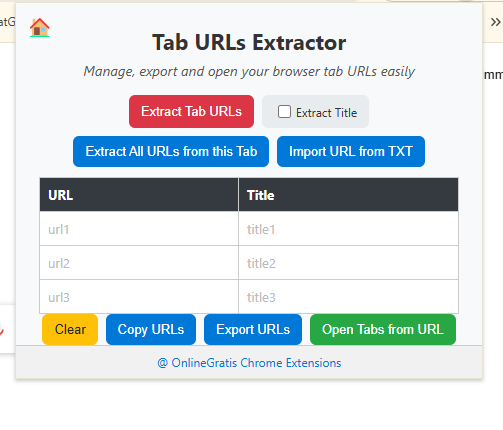
- At the top, you’ll find buttons to Extract Tab URLs, Include Titles, Import from TXT, or Extract all URLs from the current page.
- In the middle, a responsive table displays all your links with two columns: one for the URL, one for the page title.
- At the bottom, you’ll find options to Clear, Copy, Export, or Open the list of links.
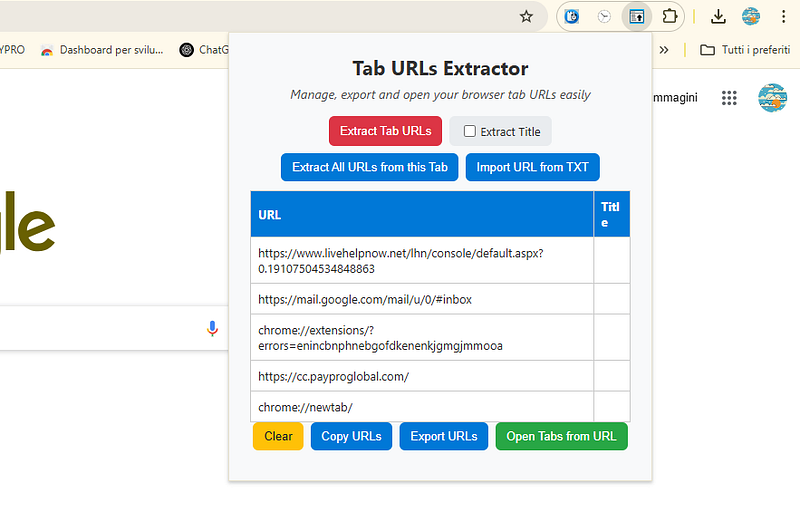
You can even access the official extension site with a click on the home icon in the top-left, or visit OnlineGratis.net through the branded footer.
✨ Smart Features Built-In
Tab URLs Extractor comes packed with intelligent features:
- Clean URLs: The extension removes extra URL parameters (everything after
?or#) for cleaner, more readable links. - Duplicate Removal: No more repeated links in your export.
- JavaScript URL Filtering: It automatically ignores links like
javascript:void(0)that aren’t real navigation URLs. - Table View: Instead of a basic textarea, the extension uses a table format, making it easier to scan, edit, or manage your list.
By default, the free version lets you process up to 20 URLs at a time (for import, copy, or export). If you exceed this limit, a modern modal window pops up where you can purchase a unlock code. Once unlocked, the limit is removed forever and saved locally on your browser (no login needed!).
🧩 Use Cases
Here are a few real-world situations where Tab URLs Extractor is a game-changer:
- Save your research: Extract all links from your session and revisit them later
- Share links with others: Export and send a list of URLs to friends, colleagues, or clients
- Resume your work later: Reimport a saved list of links and reopen them instantly
- Analyze a page’s links: Use the “Extract all URLs from this tab” option for SEO, marketing, or auditing purposes
🛡️ Privacy First
Tab URLs Extractor processes everything locally on your device. It doesn’t track, store, or transmit any data. Your URLs stay private.
🔗 Where to Get It
You can install the extension from the Chrome Web Store, or visit OnlineGratis.net for more tools and updates.
✅ Final Thoughts
Tab URLs Extractor is a lightweight yet powerful tool that will save you hours of tedious copying and clicking. It’s a must-have for researchers, content curators, developers, or anyone managing lots of browser tabs.
Try the free version today and unlock the full power when you’re ready.