Best Software to Find and Replace Text in multiple files
Best Software to Find and Replace Text in multiple files
Searching for text between files on your computer can be done with the simple Windows search function. In fact, from any folder, when you press on the word search, you can write the word to search in the text files and documents in the “content text” field.
There are more effective programs to search for words on all documents and text files that are on the PC or in a specific folder. More effective means that it searches for words even in files not considered by the Search on the Windows computer.
If you are looking for a software that not only finds text in multiple files, but also performs text replacement in a massive and automatic way, below you will find the best solution for you.
Best Software to Find and Replace Text from Multiple Files
Batch Text Find and Replace is a small program, 100% free, designed to search and replace text and words (or entire sentences) from all the files in a given folder. In addition to analyzing the files present in a folder, it is also possible to perform the massive replacement of the text even from the subfolders of that directory. In short, it is a really powerful tool that could save you a lot of hours of work!
You can download the program from THIS LINK (for Windows 11/10/8/7)
After the download you will see the following icon on your PC

Click to open the program (being a “portable” version, no installation will be done). Click and start the program directly. Here is the main interface:
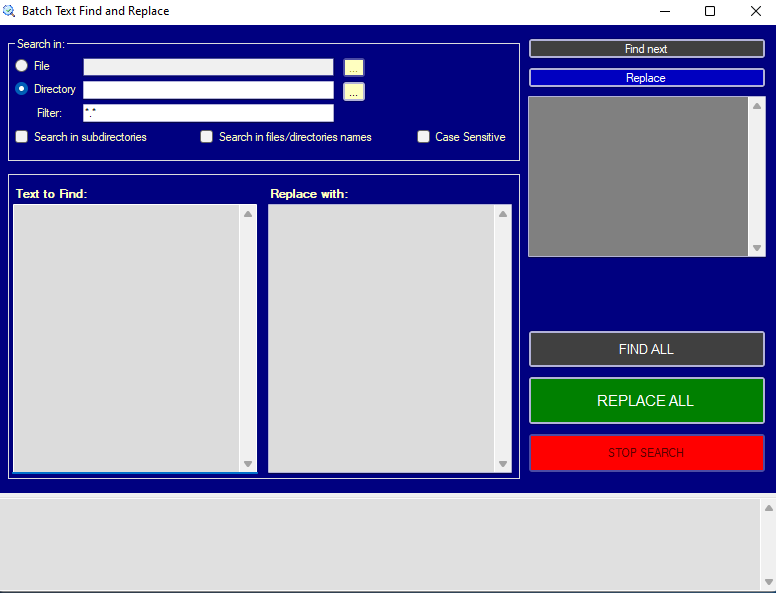
To search and replace text and words in multiple files in a folder or entire directory, here are the simple steps to follow:
Step 1. Set files or directories to scan
At the top of the program you can select an input file or set a folder / directory on your PC containing all the files to be analyzed.
Step 2. Set filters
*. * is set in the Filter field by default, which allows you to analyze all the files in the selected folder. However, if you want to analyze only files of a certain format, for example .docx format word files, just insert the * .docx filter. If you want to analyze only html files you can insert filter * .html, for excel * .xlsx, etc …
In addition to the filter, you can also select the “search in subdirectories” box to also analyze all the files present in the subfolders of the selected directory. By selecting the “case sensitive” box, the text to be searched will be searched as it is, so if you enter capital letters, the program will take it into account.
Step 3. Search and replace text
Now it’s time to insert the text to search for (in the Text to Find field) and the one to insert in its place (in the Replace with field). On the right of the program there are the buttons to start the search (FIND) and the replacement (REPLACE) both single and multiple. Press on FIND ALL to first see how many occurrences there are and then click on REPLACE ALL to perform the massive replacement of the text in all files.
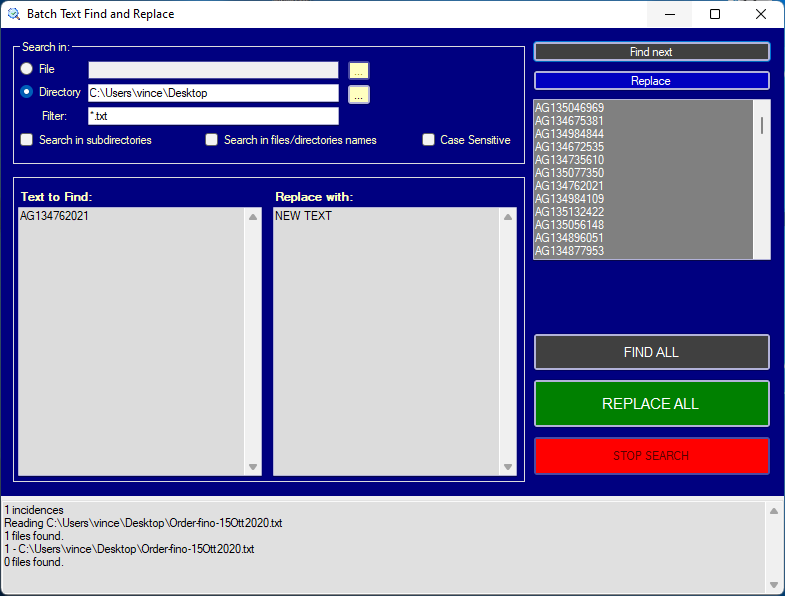
At the bottom of the program, the “logs” will appear, that is the details of all the files impacted by the replacement operation. This way you will know exactly which and how many files were changed in the operation.
Other Software to Find and Replace Words from Multiple Files
1) dnGrep is an open source search tool for Windows based on the GREP command line tool. It can search for text content within documents and archives and the program interface is simple, with all the options that allow you to set the search conditions. The application uses three plugins that you can choose from during the installation process to search within Word, Excel and PDF documents. It can search text and words on many documents together, within a folder, of type DOC, DOCX, DOCM, XLS, XSLX, XLSM and PDF; these are the supported archive formats: ZIP, 7Z, JAR, WAR, EAR, RAR, CAB, GZ, GZIP, TAR, RPM, ISO, ISX, BZ2, BZIP2, TBZ2, TBZ, TGZ, ARJ, CPIO, DEB, DMG, HFS, HFSX, LZH, LHA, LZMA, Z, TAZ, XAR, PKG, XZ, TXZ, ZIPX, EPUB, WIM, CHM.
The search process is fast and very precise. dnGrep also supports replacing words within multiple text files.
2) Text crawler is a free tool for searching and replacing words across multiple text files that helps find a keyword in multiple files and folders. It is possible to search the text directly or, for more complex operations, by entering regular expressions with variables.
This excellent little program has, in summary, the following characteristics:
- Find and replace words contained in text files of any type instantly and automatically.
- Quick search, even on large files
- Simple to use interfaceù
- Ability to set flexible search parameters through the use of variables.
- Text Extractor to extract the selected words into a new text file.
- Search and replace with regular expressions.
- Ability to save the searches made to repeat them later.
- Create backup files.
- Export the results.
To use the search for a word with TextCrawler, first you have to select the folder (starting position) in which to search then you set the file name and, the best thing if you don’t know anything, is to write *. * Which means “search for the word in all files of any format”. Finally, on the find field you write the text to find. Quickly, the program lists all the text files in which this word was found with indication of its location. The function to extract certain words from a group of files or from a long text is also very useful. For example, you can choose to extract a list of email addresses or other selected information.
3) Another great program to look up words and replace text in multiple files together is Search And Replace, free and without installation, for all versions of Windows. To replace text, search for words and then enter how they should be changed on selected files in a folder.
4) Also to search and replace words in a text file you can use Notepad++, which has this built-in function.
5) wReplace is a text editor with search and replace functionality of single words or parts of them. Thanks to a system of customizable rules that can be applied to the text. This tool is also great for selecting single special characters in programming languages.
6) Transfz is a tool for automatic text editing. The good thing about Transfz is the customization done thanks to some plugins that can be downloaded from the program’s website. Extensions include text magnifier, whitespace removal and clipboard history which makes copying and pasting faster.